See exactly what's happening inside your NetSuite. In under 60 mins.
SuiteAudit is a NetSuite-native audit SuiteApp that produces eight executive-ready reports on role security, access review, login activity, saved searches, script performance, workflow audit, file cabinet storage and SuiteScript version currency — all from a single in-account run. Findings are dispositionable and every dataset exports to Excel. Read-only. No data leaves your account.
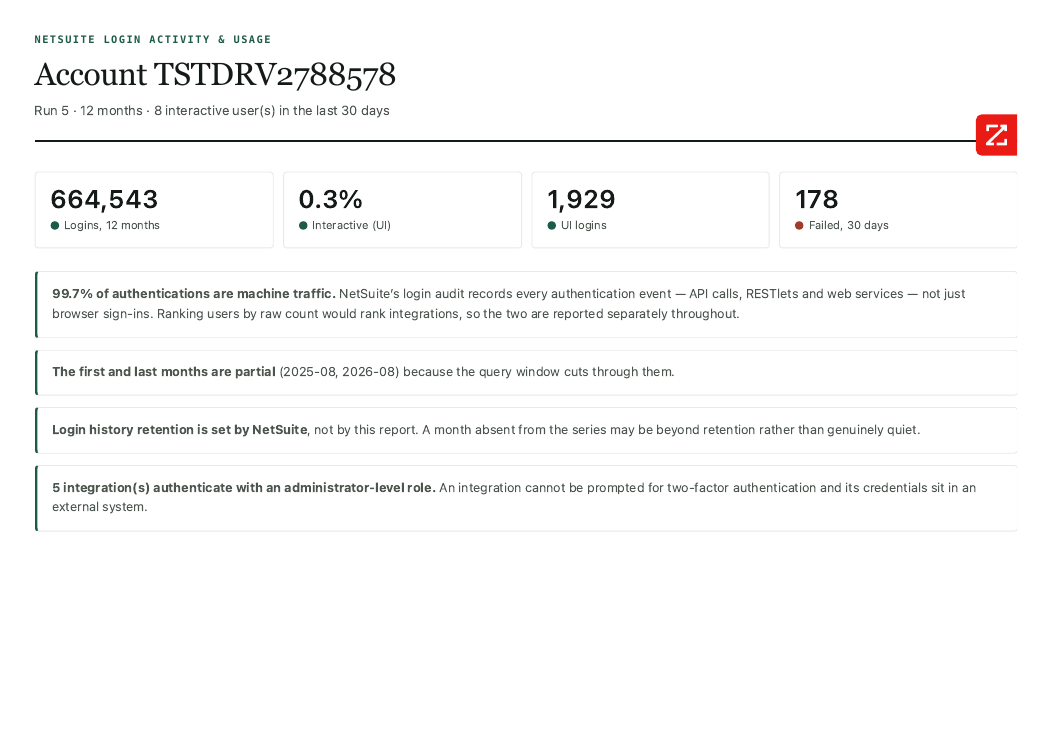
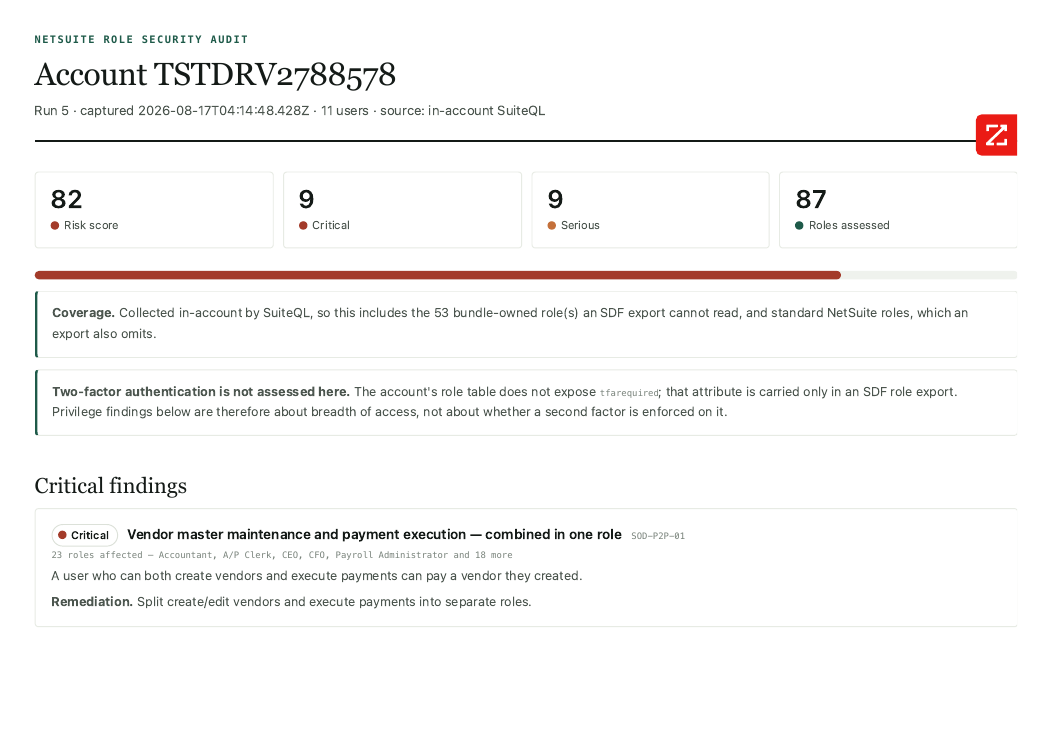
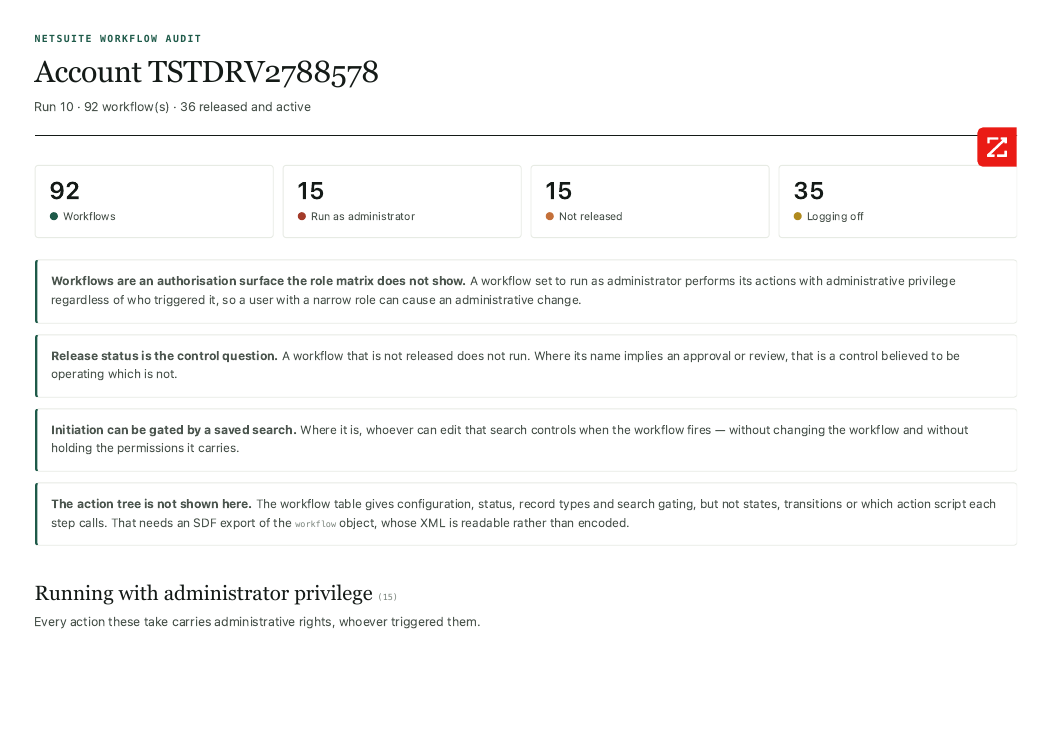
Eight reports. One engine. Built to be trusted.
A fast-scan summary of what's covered in depth further down the page — for the reader who wants the shape before the story.
Eight executive-ready reports
Role Security, Access Review, Login Activity, Saved Searches, Script Performance, Workflow Audit, Storage, SuiteScript Versions — one in-account run.
100% read-only
Reads from the permission tables and writes only to its own snapshot record. Never touches customer data, transactions, or configuration.
Runs entirely inside NetSuite
All processing via SuiteQL and SuiteScript, in-account. No external API, no SaaS layer, no third-party trust boundary.
Dispositionable findings
Every finding opens to an Accept action capturing owner, reason, approver and a re-review date. Acceptances expire after 6 months.
Gross + net scoring
Net shows real progress; gross keeps the room honest by never letting accepted findings disappear from the baseline. Self-approval is blocked.
Trending, no extra tooling
Every run writes a snapshot of risk score, role count and critical count to a native saved search — trending with zero additional setup.
Excel export, every dataset
Flattened one-row-per-relationship, UTF-8 with BOM — the shape auditors actually pivot and sample, not cells crammed with nested data.
Compliance mapping
Evidence mapped to 10 frameworks — SOC 2, ISO 27001, SOX/ITGC, NIST CSF, Essential Eight, APRA CPS 234, PCI DSS, Privacy, DORA/NIS2.
The drift you can't see is the drift that hurts you.
Every NetSuite instance accumulates governance debt after go-live. Roles proliferate. Permissions get overridden ad-hoc. Integrations authenticate with elevated privilege. Saved searches breed. Script performance decays under polls that nobody set up on purpose. Individually invisible. Collectively expensive — and, at audit time, uncomfortable.
Access sprawl you didn't authorise
Leavers still provisioned. Custom roles used by 2 users. Sensitive fields visible to people who shouldn't see them. Nobody has a source of truth — until an auditor asks.
Integrations burning your account
One integration polling every 4 minutes with 637K authentications and 52% of your script time — hidden inside "custom scripts". Standard NetSuite reporting doesn't surface this.
Saved-search sprawl
700+ searches, 26 personalised, 324 list views. Who owns what? Which are safe to archive? What data is your dashboard actually exposing?
Segregation-of-Duties gaps
Users who can both create a vendor and pay it. Users who can enter and approve their own journals. Nine SoD rules that must be checked — and are easily missed manually.
No baseline. No trend.
Without a repeatable audit, you can't tell whether your governance is improving or decaying. Every "clean" moment is a snapshot in isolation, not a trajectory.
Audit prep panic
SOC 2, ISO 27001, external auditor engagements — every one demands evidence of access control, SoD enforcement and change auditability. Assembling that manually takes weeks.
One integration burning 52% of your database time — and no-one knew it was there.
A payroll integration polling every 4 minutes was consuming 52% of all captured database execution — returning 25 rows in 10.7 seconds where the indexed path returned in 9 milliseconds. Hidden inside 'custom scripts'. Three reports converged on it: role settings said it could log in interactively; login report said it authenticated as Administrator 637K times; performance report said it consumed most of the runtime.
A control everyone believed was operating — that wasn't.
Workflows named for approval and review, marked TESTING, that never fire. Others gated by a saved search — meaning whoever can edit that search controls when the workflow triggers, without changing the workflow and without holding the permissions it carries. Neither a workflow audit nor a search audit finds this alone; SuiteAudit finds it because roles, searches and workflows are audited together.
Install once. Run whenever. Never leaves your NetSuite.
SuiteAudit installs as a native NetSuite SuiteApp bundle. All processing runs inside your NetSuite instance using SuiteQL against the standard permission tables. No data leaves your account, ever. No integrations required. No external service to trust.
Install the SuiteApp
Deploy from SuiteApp.com or a shared bundle. One Map/Reduce script, one Suitelet, one custom record. AVT can install and validate in a live session.
Run the audit
Click "Save & Execute" on the AVT Audit Collection deployment. Runs to completion with zero yields.
Review 8 reports
Open the AVT Audit Reports Suitelet. Eight reports render from the snapshot with Excel export on every dataset. Print-ready for board packs and audit files.
Prioritise + fix
Every finding names the affected roles, users or scripts. Remediation lives in your team's control. Re-run to confirm resolution and build a trend line.
An audit that remembers what you already accepted.
Most audit tools re-report the same findings every run. After the second quarter, clients stop reading. SuiteAudit gives every finding a stable identity, an acceptance workflow, and an expiry — so quarterly cadence surfaces what's actually new, not what's already been dealt with.
Dispositionable findings
Every finding opens to an Accept… action that captures owner, reason, approver and re-review date. Findings are keyed as checkId | subjectKind | internalId, so renaming a role neither orphans its acceptance nor lets another role inherit it.
Acceptances expire in 6 months
A lapsed acceptance reopens the finding and shows as Acceptance expired. An acceptance that never expires is a permanent blind spot — expiry is what makes SuiteAudit a recurring control rather than a one-off report.
Gross + net scoring
Net alone lets a client bury findings by accepting them. Gross alone ignores work already done. SuiteAudit shows both. Trend lines are net; the gross number keeps the room honest.
Self-approval blocked
Where the approver is the person the finding is about, the finding renders critical rather than accepted. Matched on employee internal id, so it cannot be evaded by name.
Every dataset flattens to Excel — the shape auditors actually use.
Findings, role inventory, employee assignments, saved searches, login activity, integrations, access tokens, performance, effective access, who-can-do-what, workflows, action scripts, exception register, file and folder inventory, duplicate groups, published files and storage by owner. Nested data is not crammed into cells — employee assignments export as one row per employee-role pair, capabilities as one row per capability-holder pair. The shape that pivots and samples. UTF-8 with BOM; accented names render correctly.
SuiteAudit meets the security bar your CISO will ask about.
100% read-only
The audit script reads from the permission tables and writes only to its own snapshot record. Never touches customer data, transactions, or configuration.
Inside your NetSuite, not on our servers
All processing runs in-account via SuiteQL and SuiteScript. No external API. No SaaS layer. No third-party trust boundary.
Negligible impact
Runs as deployed but never scheduled. Nothing runs unattended — every run is initiated by you.
Trending as a native saved search
Every run writes a snapshot record with the risk score, role count and critical count. Trending is a saved search on your own custom record — no extra tooling.
Deterministic engine, optional AI layer
The findings come from deterministic checks — not AI. AI analysis is optional, layered on top for narrative summaries and prioritisation, but never the source of truth.
Audit-file ready
Print stylesheet baked in. Reports export cleanly to PDF for SOC 2, ISO 27001, external auditor and board pack use.
One audit, many frameworks.
Where SuiteAudit fits in your NetSuite compliance story — and where it honestly stops. Ten frameworks, mapped to the evidence SuiteAudit actually produces.
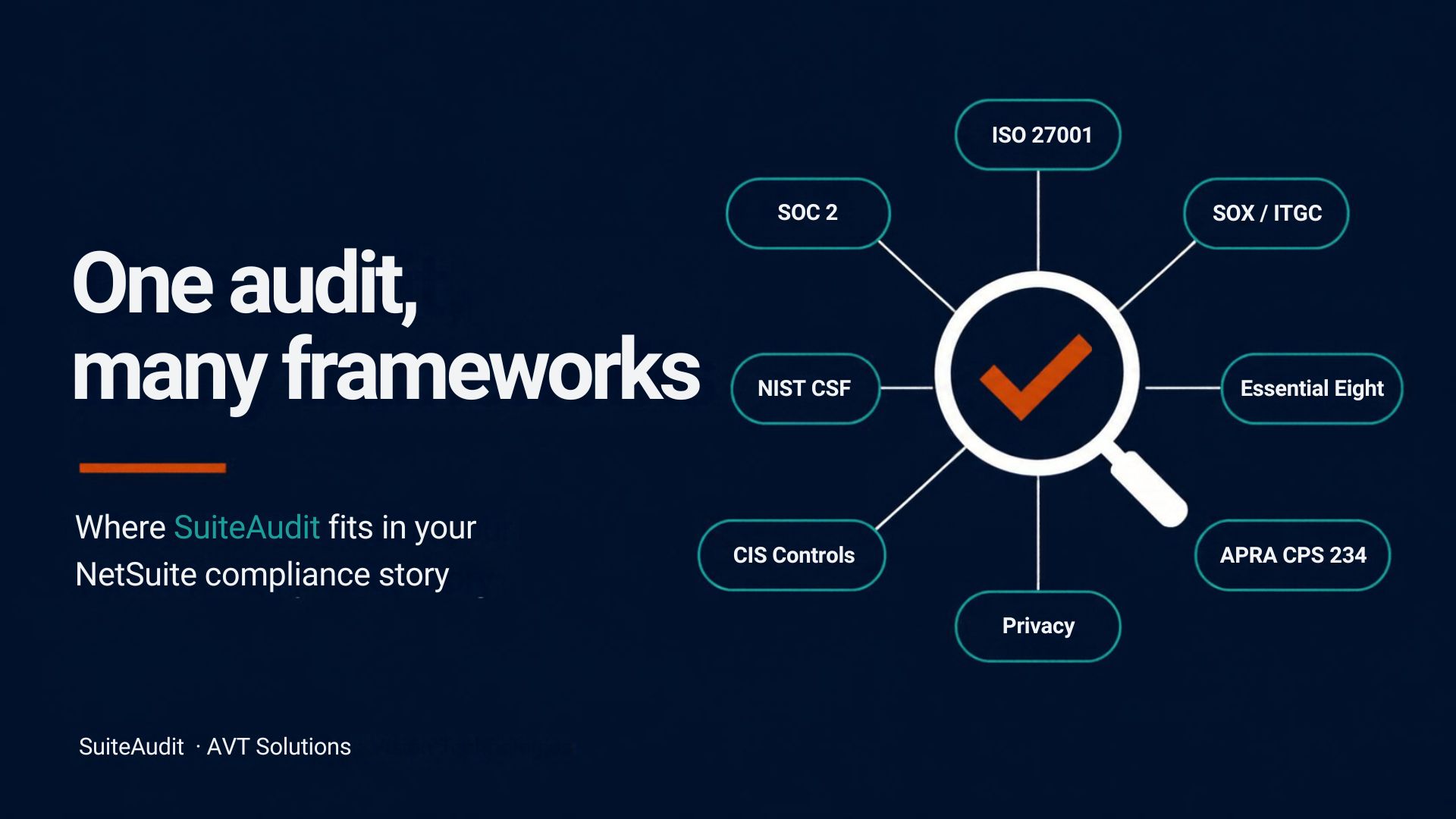
How SuiteAudit supports compliance
| Framework | SuiteAudit provides evidence for | Still your programme's job |
|---|---|---|
| SOX / ITGC (COSO) | Segregation of Duties conflicts, privileged access, leavers, access reviews, deleted financial transactions, approved exception register | Change approvals, close controls, management sign-off |
| SOC 1 / SOC 2 | Logical access (CC6), login and deletion monitoring, access-review records | The audit, policies, other trust criteria |
| ISO 27001:2022 | Access control A.5.15, segregation of duties A.5.3, access rights A.5.18, privileged access A.8.2, authentication A.8.5 | ISMS, risk assessment, Statement of Applicability, certification |
| NIST CSF 2.0 | Identity & access (PR.AA), monitoring (DE.CM), customisation inventory (ID.AM) | Govern, Respond, Recover |
| CIS Controls v8.1 | Account management (5) and access control management (6) for your ERP | Endpoints, network, backups, other controls |
| ASD Essential Eight | Restrict admin privileges and MFA configuration — NetSuite only | Patching, application control, macros, backups |
| APRA CPS 234 / 230 | Testable access-control evidence for a critical system | Resilience, tolerance levels, service providers |
| PCI DSS v4.0.1 | Requirements 7 & 8 — only if NetSuite is in card-data scope | Keep card data out of NetSuite |
| Privacy Act · DPDP · GDPR | Who can see employee and customer data; files exposed without login; no data leaves your account | Notices, consent, data rights, breach response |
| DORA / NIS2 | Access-control evidence for an in-scope system | Incident reporting, resilience testing, ICT registers |
SuiteAudit provides evidence toward these frameworks — it is not a certification or audit opinion.
Get the full compliance brochure
"SuiteAudit Insider: One Audit, Many Frameworks" — the complete 8-page breakdown, emailed to you.
Different report, different reader. Each report goes where it lands.
CFO / Finance Leader
Access Review + SoD findings + audit-ready output. What can happen without approval, and who could do it.
IT Director / CISO
Role Security score, integration authentication analysis, failed-login patterns. Where the exposure is.
NetSuite Administrator
Script Performance + Saved Searches. What's actually slow. What's actually being used. Where to clean up.
Auditor / Compliance
Baseline evidence for SOC 2, ISO 27001 and external audits. Point-in-time snapshot record for trending.
Get a free sample audit on your NetSuite.
Register interest and we'll send you the eight redacted sample reports so you can see exactly what SuiteAudit produces. For early-access customers, AVT can install SuiteAudit in your NetSuite and walk you through your live results in a 30-minute session — no commitment, no sales pitch.
- 8 redacted sample reports emailed immediately — the exact deliverable
- Every Excel export included so you can see the auditor-ready shape
- Priority early-access to SuiteAudit when the SuiteApp launches
- Founding-customer pricing locked in for the first cohort
- Optional 30-minute walkthrough of SuiteAudit run on your live NetSuite
- No commitment · no credit card · no sales pressure
Get 8 sample reports + early access
Takes 30 seconds. We'll email you the sample reports and confirm your early-access position.
Everything you might be wondering.
How many reports does SuiteAudit produce?
Eight: Role Security, Access Review, Login Activity, Saved Searches, Script Performance, Workflow Audit, Storage, Folders & Files, and SuiteScript Versions. They are never merged into a combined score — each answers a different question for a different reader. Every dataset also exports to Excel, flattened one-row-per-relationship so it pivots and samples the way auditors need.
What does the Storage, Folders & Files report cover?
Two questions, reported separately because they have different fixes: what consumes File Cabinet storage, and what the cabinet exposes. Six checks — files published without login from a non-asset folder, files both company-wide readable and published, duplicate storage, generators that write a new file each run instead of replacing, folders owned by a system account, and files whose registered type disagrees with the extension. Storage is broken down by branch, file type, folder, owner and age, with files added per month so growth is attributable.
What does the SuiteScript Versions report cover?
Every script record in the account, classified by declared API version — 1.0, 2.0, or 2.1 — with anything missing an apiversion value treated as legacy rather than clean. Each script is attributed to its creator and, separately, to whether it originated in the account or arrived through an installed bundle. Bundle-owned legacy scripts are grouped by bundle with their own version breakdown, so the account's own upgrade backlog and the vendor conversations stay separate lists, not one undifferentiated count. Scriptlets are excluded — they don't carry an independent API version.
Can it tell me which files are unused?
No, and it says so rather than guessing. Only the message link table is queryable — entity and transaction attachment tables are not — so a file may be attached somewhere the audit cannot see. "Not referenced by a message" is not "unused", and the report never presents it as such. Duplicates and regenerated files are likewise counted separately and never added together: identical copies are recoverable storage, one name at many sizes is a process defect.
Won't I just get the same report every quarter?
No — and this is the point. Every finding can be dispositioned with an Accept… action capturing owner, reason, approver and re-review date. Findings are keyed as checkId | subjectKind | internalId, so renaming a role never orphans its acceptance. Acceptances expire after 6 months, then reopen as Acceptance expired. Self-approval is blocked. Scoring shows both gross and net, so accepting findings can't bury the raw exposure. That's what makes SuiteAudit a recurring control rather than a one-off report.
Does SuiteAudit cover workflows?
Yes — and this is workflow audit as an authorisation surface, not as automation documentation. Five checks: WF-01 workflows that execute with administrator privilege regardless of who triggers them, WF-02 Active but not released workflows (a control believed to be operating that isn't), WF-03 released with execution logging disabled, WF-04 owned by an inactive employee, WF-05 initiation gated by a saved search someone else controls. The WF-05 check exists only because roles, searches and workflows are audited together — no siloed audit finds it.
Do you cover two-factor authentication?
Yes, from two independent sources. NetSuite mandates 2FA on roles holding highly privileged permissions — that cannot be disabled and is inferred from role permissions. Separately, any role can require 2FA via a per-role setting. A mandated role showing the setting as Off is still enforced, so SuiteAudit only fires the AUTH-03 finding when neither source applies. Where the setting cannot be read, it is reported as unknown, not off.
Is SuiteAudit really read-only?
Yes. The audit uses SuiteQL to query NetSuite's standard tables — role, role permissions, employee roles, login audit, script, script performance and workflow. It writes only to its own snapshot custom record for trending and, if you disposition a finding, an acceptance custom record. Nothing else in your NetSuite instance is created, modified, or touched.
Can I export findings to Excel?
Yes, every dataset. Exports across all eight reports — findings, role inventory, employee assignments, saved searches, login activity, integrations, access tokens, performance by operation, effective access, who-can-do-what, workflows, action scripts, script API versions, exception register. Files are UTF-8 with a BOM so Excel renders accented names correctly, and every export shows its row count before you click.
Does any data leave my NetSuite account?
No. All processing happens in-account via SuiteScript and SuiteQL. There is no external API, no SaaS component, no third-party trust boundary. The optional AI analysis layer can be run inside your own controlled environment.
What's the impact on my NetSuite performance?
Negligible. A full run completes with zero yields, and nothing runs on a schedule — every run is initiated manually.
What roles get audited?
All roles, including bundle-locked and standard NetSuite roles. Because SuiteAudit runs in-account against the queryable permission tables, it sees 87 roles in a typical account where an SDF export would see only the 48 custom, unlocked ones.
What NetSuite features do I need enabled?
SuiteScript, SuiteCloud Development Framework, and the standard Login Audit Trail (all enabled by default in modern NetSuite accounts). No paid modules required. The SuiteApp installs from a shared bundle in minutes.
Who builds it? Who supports it?
SuiteAudit is built and supported by AVT Solutions — Australia's leading Oracle NetSuite Solution Provider & SI, with 20+ years and 100+ NetSuite implementations. We also build the CPQ, S&OP, Collections, Present & Pay, SuiteOrder, Print Node, SmartFreight and Salesforce Connector SuiteApps used across ANZ.
What will it cost?
Pricing is being finalised. Founding-cohort customers lock in preferential pricing. Register on the waitlist for pricing detail as soon as it's available.
Can I see it in action?
Yes. Register on the waitlist and we'll send the eight redacted sample reports immediately, plus every Excel export. For early-access customers, AVT can install SuiteAudit in your NetSuite and run it live in a 30-minute session — no commitment.
Ready to see what's actually happening inside your NetSuite?
Get the free sample audit reports and a walkthrough — 30 seconds to register, no commitment.
Get the sample audit →