Built for Oracle NetSuite SuiteApp · Native Bundle

Resource allocation, drag-and-drop scheduling and workload planning — inside NetSuite.

AVT Resource Management gives NetSuite project, services and operations teams the three things the standard module is missing: allocate resources by skill and availability, schedule by dragging tasks across people and dates, and visualise workload across annual, monthly and daily horizons.

Resource Allocation Match tasks to people by skill, role and availability
Drag-and-Drop Scheduling Move work across resources with live conflict detection
Workload Planning Annual, monthly and daily Workload Viewer with utilisation heatmaps
Workload Viewer · Live
Drag · Drop · Reschedule
Aiden S.
Assembly 1
Brandy D.
PROJ-2041
Configure SuiteApp
ACME · WMS16h
PROJ-2108
Design review
Helios · CPQ4h
CASE-4480
Production support
Vortex Mfg6h
PROJ-2065
UAT walkthrough
Bright Ltd8h · Aiden S.
+32%
Billable
Utilisation
✓ No conflicts
Launch Story

See AVT Resource Management in action

A 90-second tour of how AVT Resource Management orchestrates workload, availability, and scheduling — purpose-built for NetSuite.

Trusted By NetSuite Teams Scheduling
💼
Project Services
Consultants & PMs
🔧
Field Operations
Technicians & crews
💻
Software Implementers
SaaS & ERP delivery
🏗️
Engineering Consultancies
Multi-discipline teams
MSP / IT Services
Managed & dispatch
100%
Native NetSuite
+32%
Billable Utilisation
−40%
Planning Time
4–8 wks
Time to Go-Live

You're already on NetSuite. So why is your resource plan still in a spreadsheet?

Most NetSuite teams hit the same wall — the standard NetSuite resource allocation module is built for high-level capacity, not real scheduling. So planners default to Excel, Smartsheet or a separate PSA tool, and you end up paying the integration tax every month-end.

📉
Without AVT
  • Resource plan lives in Excel — out of date the moment a project shifts
  • Native NetSuite resource allocation can't drag-and-drop or visualise conflicts
  • Third-party PSA tools demand sync layers, duplicate logins and reconciliation
  • Time entry happens in a separate app — billing waits for end-of-week imports
  • No real picture of utilisation until the finance team rebuilds it monthly
📈
With AVT Resource Management
  • Schedule across annual, monthly and daily views without leaving NetSuite
  • Drag-and-drop allocations with real-time conflict detection on the same row
  • Lives inside your existing roles, permissions, custom fields and saved searches
  • Mobile time tracking writes straight to projects, time bills and invoicing
  • Live utilisation, capacity and billable-hour dashboards refresh on every change

From a 365-day capacity plan down to a single-day conflict — one Workload Viewer

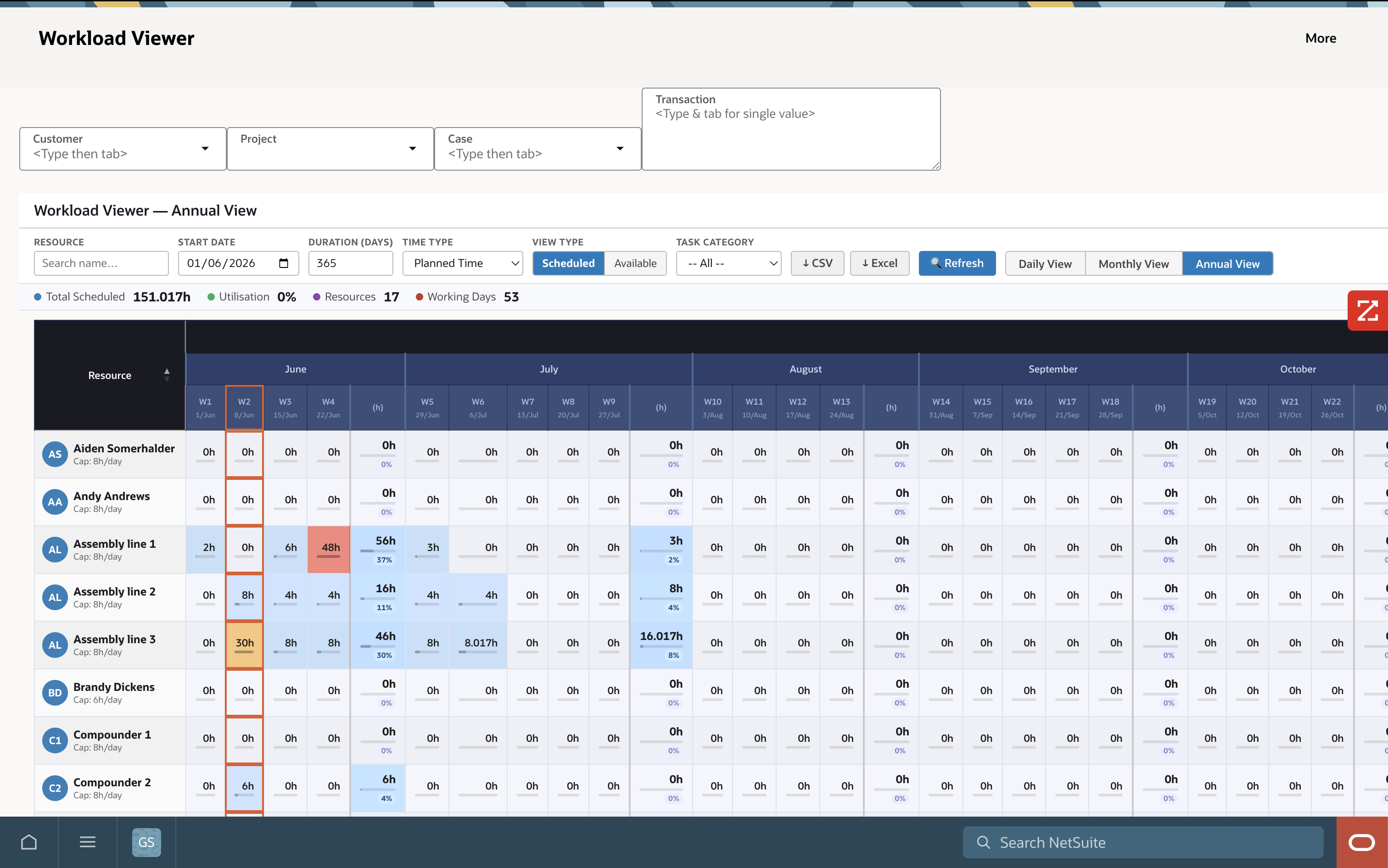
The Workload Viewer is the heart of AVT Resource Management. Toggle between Annual, Monthly and Daily horizons; flip between Scheduled and Available time; filter by Customer, Project, Case or Transaction. Heatmaps tell you instantly where you have capacity and where you're already overbooked.
netsuite.com › AVT Resource Mgmt › Workload Viewer — Annual
AVT Workload Viewer — Annual View showing 365-day capacity plan across resources

Annual capacity at a glance

One screen, one resource per row, every week of the next 12 months. Spot understaffed quarters before they bite.

Week-level scheduled hours

Each cell shows the total scheduled hours for that week and the % of capacity used — sortable, filterable, exportable.

Hover for daily detail

Hover any week cell to drill into the daily breakdown without leaving the annual horizon.
netsuite.com › AVT Resource Mgmt › Workload Viewer — Monthly
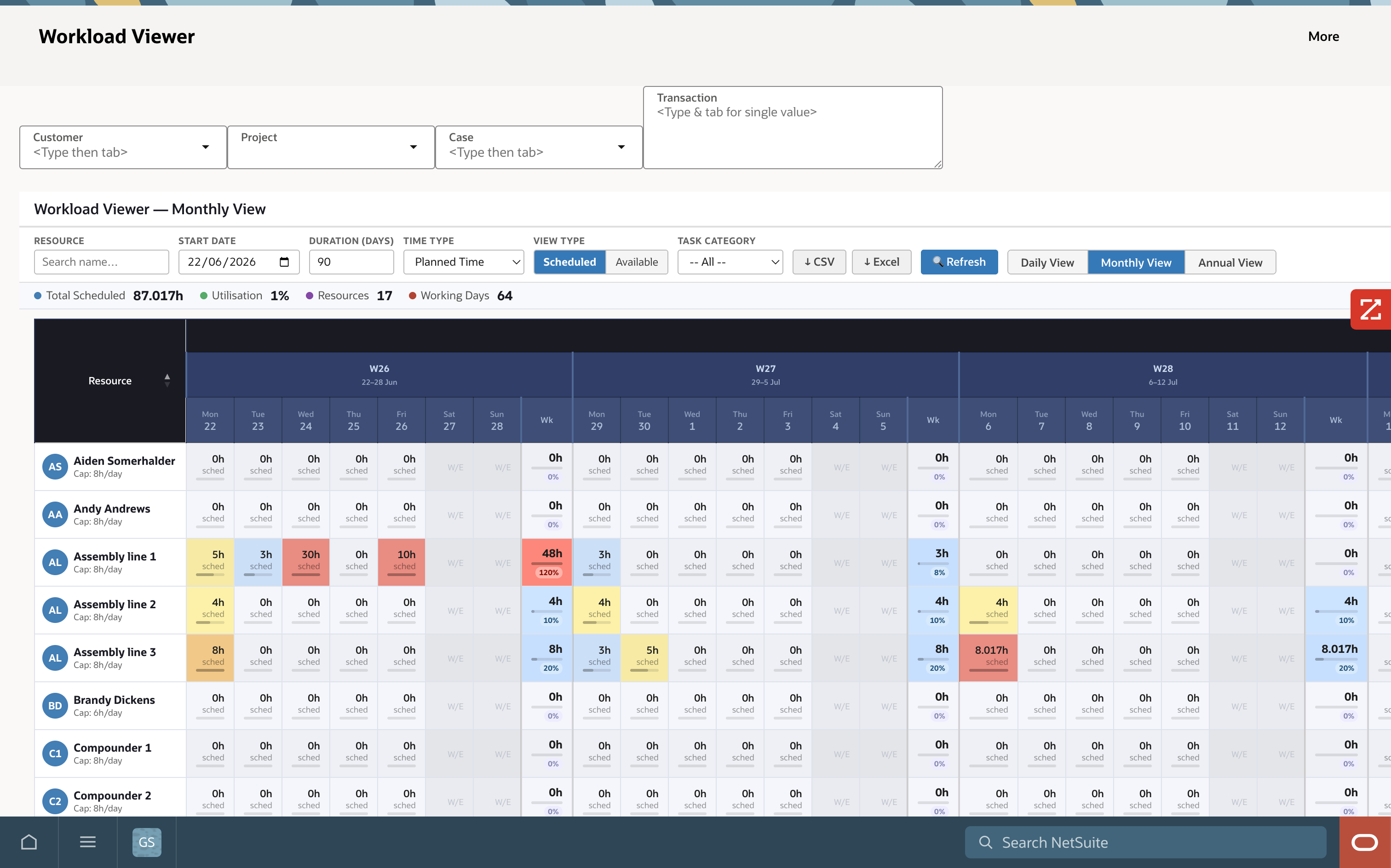
AVT Workload Viewer — Monthly View showing 3 weeks (W26–W28) of scheduled hours per resource with over-allocation flagged in red

Three weeks at a time

Each row is one resource, each column is one day — three weeks visible side-by-side for sprint and project stand-up planning.

Weekly roll-up & utilisation

Every week ends with a "Wk" column showing total scheduled hours plus the % of capacity used — green, amber, red traffic-light.

Over-allocations flagged inline

Assembly line 1 is booked 120% in W26 — the cell turns red the instant you save the allocation. Drag a task to clear it.
netsuite.com › AVT Resource Mgmt › Workload Viewer — Daily
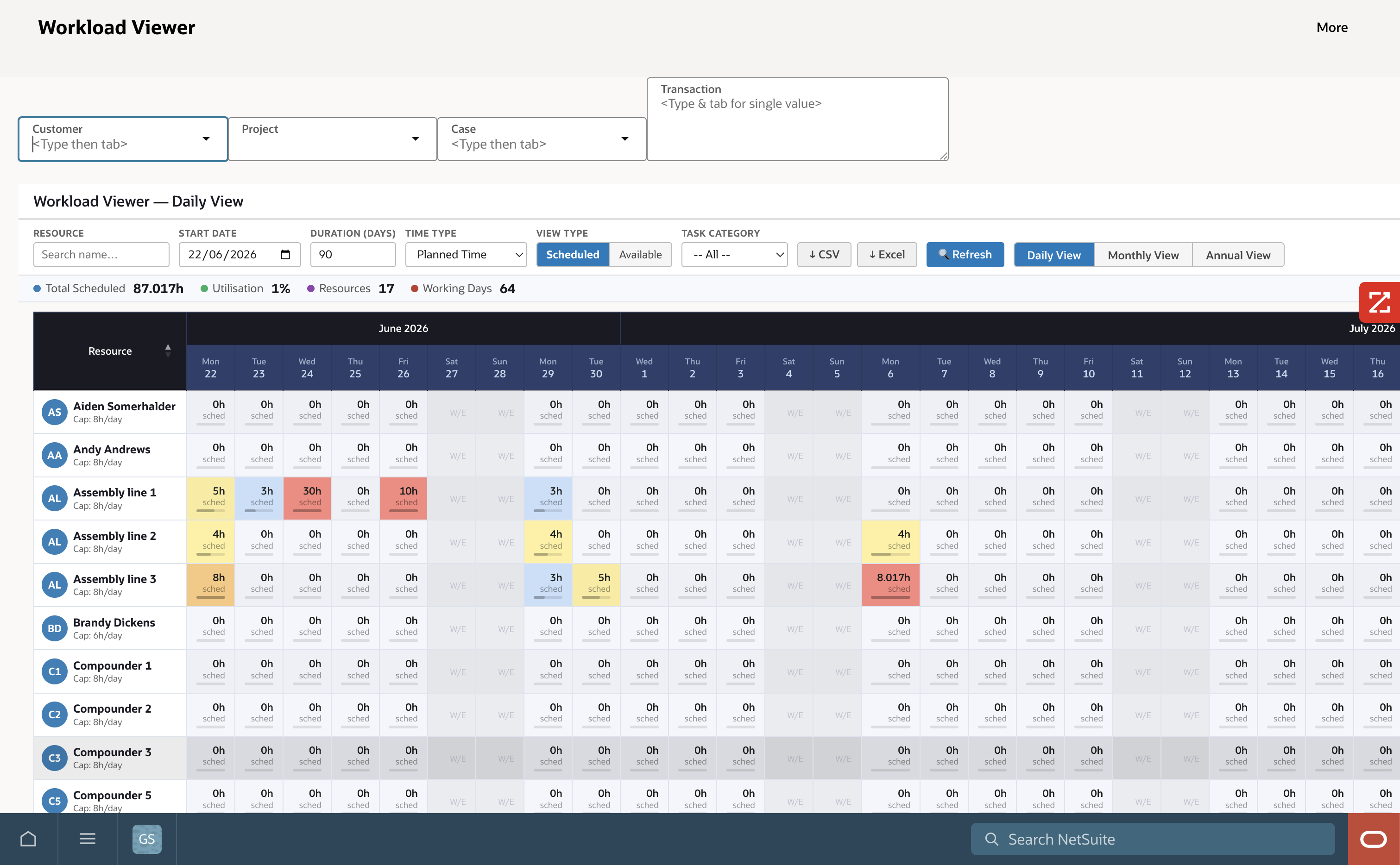
AVT Workload Viewer — Daily View showing scheduled hours per resource across June and July with weekends auto-shaded

Day-by-day across the rolling window

Mon-to-Mon detail spanning weeks of work in one screen — ideal for dispatch, daily stand-ups and end-of-day reschedules.

Weekends auto-shaded

W/E cells dim automatically — no manual calendar maintenance, no false alarms on Saturdays and Sundays.

Per-resource daily cap

Resource cap (6h, 8h, custom) is honoured per row, so part-time, contract and casual staff allocate correctly.
netsuite.com › AVT Resource Mgmt › Workload Viewer — Availability
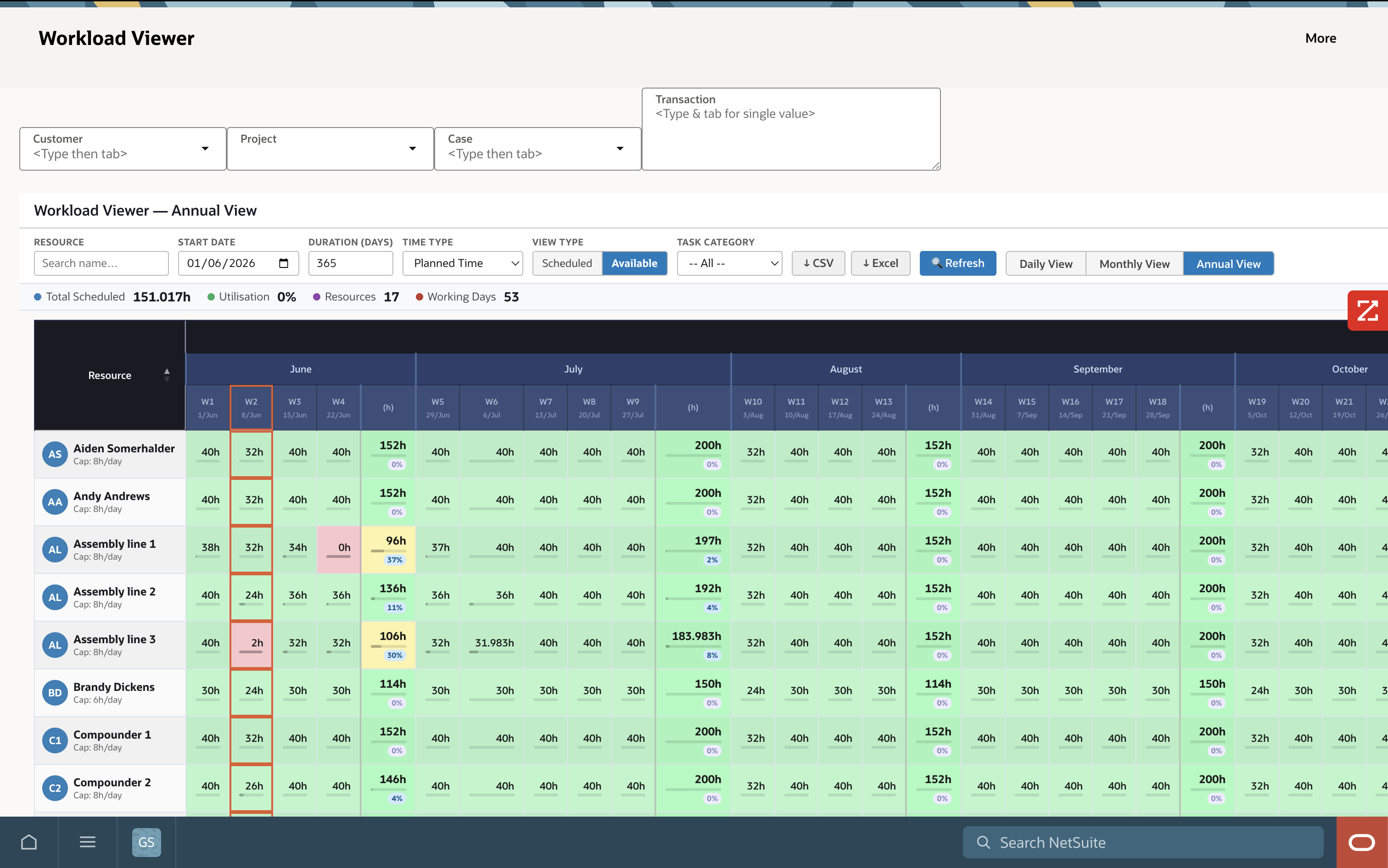
AVT Workload Viewer — Annual availability heatmap with green/amber/red cells across 12 months

Available time, not just scheduled

Flip the View Type toggle to see what's free, not what's booked. Critical for inbound project sales and capacity bidding.

Heatmap surfaces bottlenecks

Yellow / red weeks tell you instantly which months need hiring, contracting or scope re-negotiation.

Export to CSV or Excel

One click exports any filtered view for share with finance, customers or external stakeholders.

Everything a NetSuite resource planner needs — in one bundle

Six modules, one SuiteApp install. Switch on what you need, when you need it. No extra logins, no extra licences, no extra reconciliation.

🗓️
Drag-and-Drop Scheduling
Move tasks across resources and dates by dragging. Conflicts, over-allocations and skill mismatches flag inline as you go.
+ Real-time conflict alerts
📊
Interactive Gantt Charts
Full Gantt visualisation by customer, project or resource. Drag bars to reschedule, link predecessors, set milestones.
+ Dependency tracking
🔥
Workload & Utilisation Heatmaps
Annual, monthly and daily heatmaps show where capacity is open, tight or already overbooked — across teams or individuals.
+ Billable vs. non-billable split
📱
Mobile Time Tracking
iOS & Android app for field staff and consultants. Start / stop timers, log time bills, submit timesheets — synced live to NetSuite.
+ Offline-capable
📆
Google & Outlook Sync
Two-way sync with Google Calendar and Microsoft 365. Resources see their NetSuite allocations alongside everything else.
+ Native OAuth integration
🎯
Skills & Role-Based Matching
Match tasks to people by skill, certification, role or geography. Find the right available resource in seconds, not hours.
+ Custom skill taxonomies

Field-friendly time entry — writes straight to NetSuite

For consultants on-site, technicians in the field and remote teams. The AVT Resource Management mobile app captures real time against real projects, with offline support for poor reception zones — and pushes straight to NetSuite Time Bills.

  • Start / stop timersTap to start, tap to stop. Switch between tasks without losing seconds.
  • 📍
    Project & case pickerPre-filtered to what's assigned to you — no scrolling through 500 projects to find yours.
  • ✈️
    Offline-capableLog time on planes, basements and remote sites. Auto-syncs when you reconnect.
  • 📤
    Weekly timesheet submissionReview the week, edit if needed, submit for approval — all from the phone.
See the Mobile Demo →
9:42● ● ●
Good morning
Aiden Somerhalder
Now tracking
01:24:36
Customer ACME · WMS Rollout · Configure
Pause Stop & Log
Today's Tasks
PROJ-2041
Configure SuiteApp
ACME · WMS Rollout
Active
PROJ-2065
UAT walkthrough
Bright Ltd · Discovery
2.5h
CASE-4480
Production support
Vortex Mfg · Open
3:30pm
PROJ-2108
Design review
Helios · CPQ Phase 2
4:30pm

NetSuite teams who live or die by billable utilisation

If your business model depends on scheduling people against revenue-generating work, AVT Resource Management was built for you.

🏭
Project Manufacturing
Schedule shop-floor crews, machine cells and engineers against work orders. Track WO labour hours back to job costing in real time.
Work Orders Job Cost Shifts
💼
Professional Services
Plan billable consultants across client engagements. Maximise utilisation, surface bench time, forecast revenue by month.
PSA Time Bills Utilisation
💻
Software Implementers
SaaS, ERP and digital agencies running multi-phase rollouts. Schedule by skill, certification and customer priority.
Phases Skills SOW Tracking
🔧
Field Services & MSPs
Dispatch technicians, engineers and field crews against cases. Mobile time entry, GPS-aware allocations, SLA tracking.
Dispatch SLA Field Time

Plays nicely with the rest of your stack

Native NetSuite first. Two-way sync where it matters. No middleware.

What NetSuite teams see in the first 90 days

Real numbers across AVT's project services, software implementer and field operations customers running AVT Resource Management.

+32%
Billable Utilisation
Average lift across project services customers
−40%
Planning Time
Hours/week recovered from Excel re-keying
2.4×
Schedule Accuracy
Plan vs. actual closer alignment vs. spreadsheets
−5 days
Faster Invoicing
Time bills land in NetSuite the same day

From kick-off to go-live in 4–8 weeks

A proven SuiteApp deployment playbook delivered by senior AVT NetSuite consultants — no offshore juniors, no surprise scope changes.

1
Discover
Map your current scheduling pain, resource model and reporting needs.
Week 1
2
Design
Configure resources, skills, calendars, capacity rules, custom roles.
Weeks 1–2
3
Build & Integrate
SuiteApp install, Google / Outlook sync, mobile rollout, custom dashboards.
Weeks 2–5
4
Train & UAT
Planner training, end-user training, parallel running and refinement.
Weeks 5–7
5
Go Live
Cutover, 30-day hypercare, optimisation sprint after first month-end.
Week 8
We went from a spreadsheet that was always two days out of date to a real-time picture of every consultant. Billable utilisation jumped from 58% to 76% in the first quarter.
+18 pts
Billable utilisation
58% → 76% in Q1 post-launch
12 hrs
Saved per week
Resource manager planning overhead
100%
Mobile timesheet adoption
All 65 consultants in week 3
6 wks
Total deployment
Kick-off to full go-live

NetSuite-specific questions, answered

Do I need NetSuite to use AVT Resource Management?
Yes — AVT Resource Management is a native NetSuite SuiteApp. It installs inside your NetSuite instance and runs against your existing employees, customers, projects, cases and saved searches. If you're not yet on NetSuite, book a Discovery session first.
How is this different from NetSuite's standard Resource Allocation?
NetSuite's native Resource Allocation is good for high-level capacity planning, but it lacks drag-and-drop, interactive Gantts, daily availability heatmaps, mobile time tracking and Google / Outlook sync. AVT Resource Management adds all of that without replacing the underlying NetSuite project, time bill or invoicing data — it builds on top of it.
Does it work with NetSuite SuiteProjects or OpenAir?
SuiteProjects Pro (formerly OpenAir) and AVT Resource Management solve different problems — OpenAir is a separate PSA cloud, while AVT runs natively inside NetSuite ERP. Most customers running NetSuite-only ERP find AVT a better fit; OpenAir customers usually keep OpenAir for billing and add AVT for scheduling. We can walk you through the right fit in a 30-minute call.
Can we run it across multiple subsidiaries / OneWorld?
Yes — full OneWorld support. Resources, projects, customers and time bills all respect subsidiary boundaries, currencies and tax jurisdictions. Each planner only sees their own org's data; senior management gets consolidated utilisation across the group.
How long does implementation take?
4–8 weeks for a standard deployment, depending on integrations, custom roles and number of resources. AVT follows a proven phased playbook with senior NetSuite consultants — no offshore juniors. Multi-subsidiary or complex skill-matching configurations can add 2–4 weeks.
What does AVT Resource Management cost?
Licensed by the number of scheduled resources, not by the number of NetSuite users. Mobile time tracking is included. AVT will model the bundle for your team size in a 30-minute call — request pricing here.
Does mobile time tracking work offline?
Yes. The iOS and Android app caches your active tasks, timer state and submitted entries locally. Field consultants and technicians can log time on planes, basements, remote sites — entries auto-sync to NetSuite when the device reconnects.
Can we sync to Google Calendar and Microsoft 365?
Yes, two-way native OAuth sync to both. Resources see their NetSuite allocations alongside their personal and meeting calendar. Changes flow either way — drag a NetSuite allocation, the calendar updates; reschedule a calendar block, the NetSuite plan reflects it.

Ready to stop scheduling in Excel?

Book a free 30-minute demo with AVT's senior NetSuite consultants. We'll show you the Workload Viewer running against sample data and discuss how it would map to your team, your projects and your billing model — no commitment.