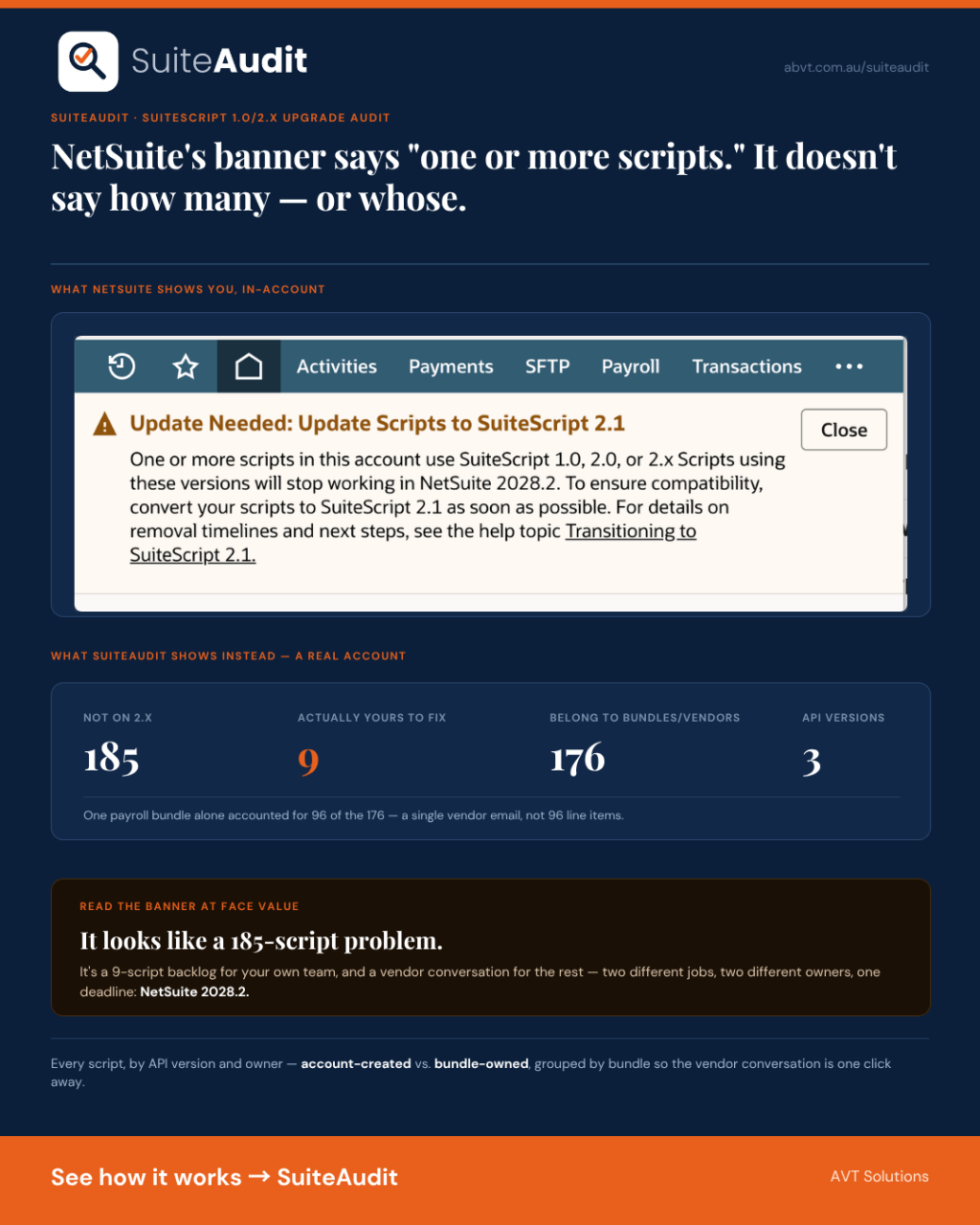
NetSuite has started showing a warning inside accounts that still run older custom code: “Update Needed: Update Scripts to SuiteScript 2.1.” The full text is blunt — one or more scripts in the account use SuiteScript 1.0, 2.0, or 2.x, those versions will stop working in NetSuite 2028.2, and admins should convert to 2.1 “as soon as possible.” It links to a help topic and nothing else.
The banner is correct. NetSuite really is retiring SuiteScript 1.0 (introduced in 2006) and the 2.0/2.x line in favour of 2.1, which shipped in 2020 on a modern ECMAScript base. Independent advisories have echoed the same 2028.2 cutover date NetSuite shows in-account. Roughly two years out from now — close enough to matter, far enough that most teams will spend the next year not thinking about it, then panic in the last six months.
What the banner doesn’t do is tell you anything you can act on. Not which scripts. Not how many. Not whether they’re even yours to fix.
The question the banner can’t answer
Every migration guide written about this — including the advisory from RSM, one of the more detailed public writeups — opens with the same first step: inventory your scripts, identify what’s actually business-critical, and prioritise before you start converting anything. Sound advice. NetSuite gives you no built-in way to do it. The Scripts list doesn’t expose API version as a column you can sort or filter by. It doesn’t separate scripts you wrote from scripts that arrived bundled with something you installed. A “Payroll” bundle and a five-year-old commission automation script show up looking identical — same list, same lack of context — and the warning banner just says “one or more.”
That distinction between account-owned and bundle-owned turns out to matter more than the raw count. We ran the new report against a live sample account and the split was stark:
476 scripts in the account. 185 not on SuiteScript 2.x — the number the NetSuite banner is warning about. Of those 185, only 9 were created inside the account itself. The other 176 belong to nine different installed bundles — one payroll bundle alone accounts for 96 of them.
Read the banner at face value and it looks like a 185-script problem. It’s actually a 9-script problem for the account’s own team, and a “go talk to nine different bundle vendors” problem for everything else — two completely different pieces of work, with two different owners, that NetSuite’s own warning makes no attempt to separate.
What the report actually shows
SuiteAudit’s new SuiteScript 1.0/2.x Upgrade Audit pulls every script record in the account — excluding scriptlets, which don’t carry an independent API version — and classifies each one by its declared API version. Anything not on 2.0 or 2.1, including a script whose apiversion field never populated at all, counts as legacy.
For each script, the report shows:
- Script name, internal ID, and type (Scheduled, Client, User Event, and so on)
- Declared API version, or flagged as missing
- Owner — the employee record, by name and ID, who created it
- Whether it originates in the account or arrived through an installed bundle, and which bundle
Bundle-owned legacy scripts are grouped by bundle, each with its own version breakdown, so a conversation with a specific vendor about a specific bundle takes ten seconds to set up instead of an afternoon of cross-referencing. Account-created legacy scripts are listed on their own as exactly what they are: the account’s own backlog, with nobody else to hand it to.
One honest complication, and how we handled it
NetSuite’s script records expose a frombundle field meant to indicate bundle origin. It doesn’t work as a filter the obvious way — every script in the account satisfies frombundle IS NOT NULL regardless of whether it actually came from a bundle, which we confirmed empirically rather than assumed. A report built on that predicate would silently misclassify every script in the account as bundle-owned. Ours doesn’t use it as a filter at all: the account-versus-bundle split is computed from an unconditional fetch of every script, evaluated in code against the field’s actual contents, not trusted as a working SQL condition. It’s the same standard the rest of SuiteAudit holds to — a number only gets reported once we’ve checked that the query producing it means what it claims to mean.
What this doesn’t do
The report tells you what’s on the account today and who owns fixing it. It doesn’t test whether a converted script will behave identically to the original — that’s still real engineering work, script by script, and no audit tool should pretend otherwise. And it’s a snapshot: accurate at extract time, not a live monitor. If a bundle gets updated or a new script gets deployed next week, that’s the next run’s job to catch, not this one’s.
Next steps
- See the full SuiteAudit governance and security audit SuiteApp, or register for a free redacted sample audit of your own account.
- Run a broader NetSuite Health Check if script performance and version currency are two of several areas you want assessed together.
- Book a no-obligation NetSuite evaluation call with AVT to talk through your account’s own migration backlog before 2028.2 gets close.
