Segregation of duties gets treated as a checklist item: make sure the person who approves purchase orders isn’t also the person who cuts the payment, make sure nobody reconciles the cash they collected themselves. Those rules are correct, and every NetSuite implementation guide repeats them. They’re also not where most of the real exposure lives.
NetSuite governs access through several hundred distinct permissions, combined into roles, assigned to employees who often hold more than one role at a time. A single role can look clean in isolation — no obvious conflict, nothing that trips an auditor’s checklist — and still hand a user unchecked control over a financial process once you add up everything their other roles grant them. That combination is exactly what gets missed, because reviewing it means manually cross-referencing every employee’s full role stack against nine or more conflict patterns, for every employee, every quarter. Nobody does that by hand at scale, so it doesn’t get done at all — until an auditor finds it, or someone exploits it.
Why single-role reviews aren’t enough
Most segregation-of-duties frameworks — including the general guidance circulating for NetSuite — describe the conflict at the function level: don’t let one person both initiate and approve payments, don’t let a system administrator approve their own access changes, don’t let the same employee handle receipts and reconciliation. That framing is right, but it implicitly assumes the conflict lives inside a single role definition. In practice, it rarely does.
A NetSuite account accumulates roles the way any live system does: a role built for AP two years ago, a role built for a project six months ago, a temporary role that was supposed to be removed after go-live and never was. An employee ends up holding two or three of these at once, none of which look dangerous on its own. The danger is additive, and it’s invisible to anyone reviewing roles one at a time.
SuiteAudit’s segregation-of-duties engine evaluates every rule twice: once against each role in isolation, and once against the combined permission set of every role a given employee actually holds.
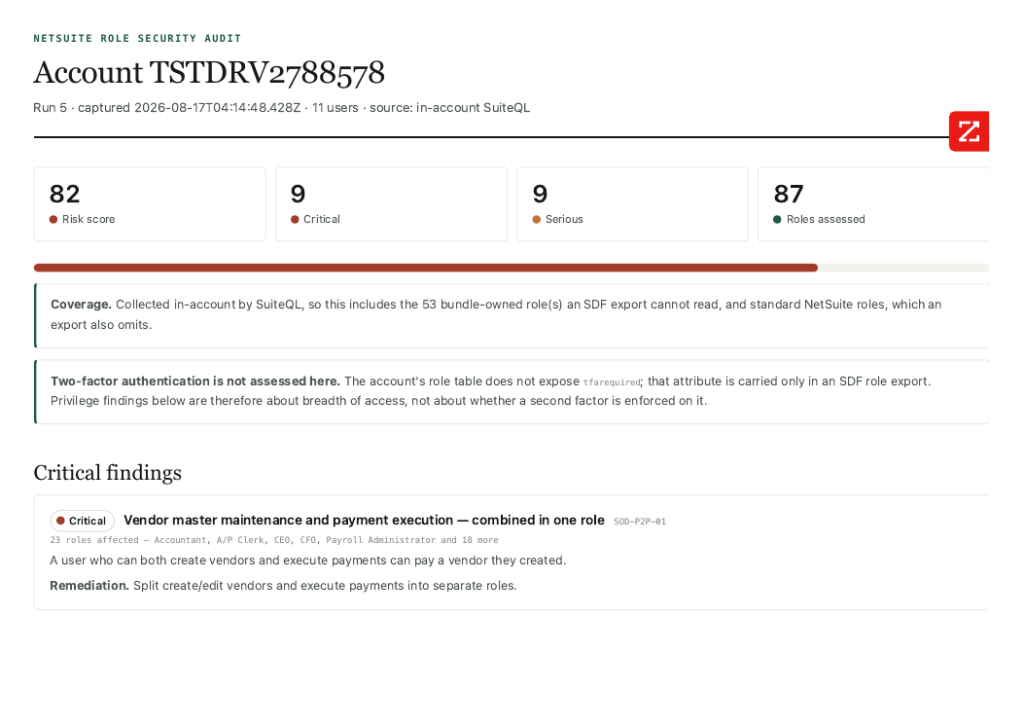
The nine rules in the matrix aren’t generic templates borrowed from a broader GRC framework — each one is checked against the account’s live permission keys, so the finding is tied to a real permission the account actually grants, not a theoretical pattern that may not even apply to how the role was built.
The other failure mode: noise
There’s a second, quieter problem with automated SoD checking: false positives. Run a rigid rule set against a real account and you’ll flag “conflicts” that are actually fine — a controller who legitimately needs both permissions for a three-person finance team, a role that’s inactive and assigned to nobody. Auditors have started calling these phantom conflicts, and they’re arguably worse than missing a real one, because after the third false alarm, nobody trusts the tool and the real findings stop getting attention.
SuiteAudit handles this two ways:
- Hygiene is separated from conflict. An inactive role still held by an active user, or an active role nobody is assigned to, gets flagged as a housekeeping issue — not dressed up as a segregation-of-duties violation.
- The score is scaled by prevalence, not by role count. Risk is calculated per distinct control weakness and scaled by how often it actually recurs across the account, not per affected role. An account with forty near-identical roles built off the same flawed template doesn’t get penalised forty times over — and it doesn’t get a meaningless clean score just because the underlying weakness only shows up once in the role list.
The number has to mean something when you’re comparing one client’s report to another’s — and to their own report from six months ago.
What actually gets reported
Underneath the SoD matrix, SuiteAudit runs a baseline pass looking for the specific, checkable failure modes that consistently cause real damage:
- High-privilege or administrative roles without two-factor authentication
- Custom roles carrying Core Administration Permission, which quietly grants far more than most role designers intend
- Integration-named roles that can still log into the UI
- Privileged roles scoped across every subsidiary in a multi-entity account, instead of the one they’re meant to touch
Every one of these traces back to a specific field in the role’s XML definition — nothing is inferred or estimated.
And because a role review is only half the picture, we say plainly where it stops. Standard NetSuite roles aren’t exportable and can’t be assessed. Bundle-locked roles can’t be pulled either, but they’re named explicitly in the report rather than silently missing, so nobody mistakes an unreviewable role for a clean one. A role review shows role design, not effective access after restrictions applied elsewhere in the account. And it’s a snapshot — accurate at extract time, not a running guarantee. Most vendors in this space would rather you not think about what their tool can’t see. We’d rather you know before you rely on the report.
Built for one thing
SuiteAudit isn’t a general ERP governance platform with a NetSuite connector bolted on. It’s built directly against NetSuite’s own role and permission model, pulled through a single read-only RESTlet deployed in your account — it creates and modifies nothing, which matters when the tool doing the audit shouldn’t itself become an access risk.
The output is a standalone, client-ready report your auditors, your board, or your acquirer’s due-diligence team can read without a login or a subscription: role security scored and prioritised, segregation-of-duties conflicts traced to the actual roles and users involved, and the limits of the review stated up front.
If your last access review was a spreadsheet someone built by hand, or you’ve never actually checked what happens when an employee’s two “harmless” roles are combined, that’s exactly the gap SuiteAudit is built to close.
Next steps
- See the full SuiteAudit governance and security audit SuiteApp — six report modules including Role Security and Access Review, or register for a free redacted sample audit.
- Run a broader NetSuite Health Check if role security is one of several areas you want assessed alongside performance and data quality.
- Book a no-obligation NetSuite evaluation call with AVT to discuss your account’s specific role and access history.