Earlier this year Oracle NetSuite laid out an end-of-life schedule that will materially affect thousands of live integrations across the platform. Two of the technologies most NetSuite operators quietly depend on — SOAP Web Services and Token-Based Authentication (TBA) — are being retired and replaced with the modern OAuth 2.0 framework and REST APIs.
If your business runs NetSuite alongside a 3PL, a payment processor, a Salesforce or HubSpot instance, a warehouse management system, a bank feed, an EDI partner, an eCommerce storefront, or any middleware platform (Celigo, Boomi, MuleSoft, Workato), this change concerns you. And the timelines are closer than most teams realise.
This paper explains what is changing, when, why it matters, and how mid-market Australian businesses can plan a calm, low-risk migration long before the deadlines bite.
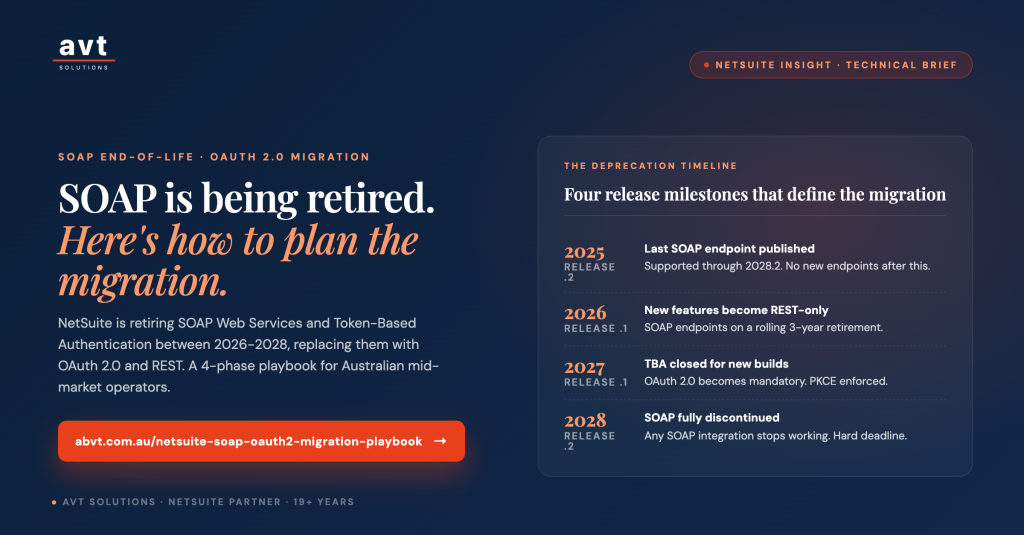
The timeline in one page
| Release | What happens | Impact |
|---|---|---|
| 2025.2 | Last scheduled SOAP endpoint published. Supported until 2028.2. | No new SOAP endpoints will be issued after this. |
| 2026.1 | New SOAP endpoints are no longer provided by default. Existing endpoints continue on a rolling three-year support window. New NetSuite features become REST-only. | Anything net-new must be REST + OAuth 2.0. |
| 2027.1 | No new integrations may be created using Token-Based Authentication (TBA) for REST or RESTlets. PKCE becomes mandatory for new OAuth 2.0 authorization-code flows. Only the 2025.2 SOAP endpoint remains supported. | OAuth 2.0 mandatory for all net-new integration builds. |
| 2028.2 | SOAP Web Services fully discontinued. Any integration still using SOAP stops working. | Hard deadline. No further extensions. |
The nuance to understand: existing TBA integrations are not forcefully shut off in 2027.1. They continue to run. But the moment you need to add a new integration, refresh credentials, or make a substantive change, you’ll be forced onto OAuth 2.0. In practice, that means most healthy IT teams will be migrating throughout 2026 and 2027 — not scrambling at the 2028.2 cliff.
Why NetSuite is making this change
SOAP and TBA (which is OAuth 1.0a under the hood) are 15+ years old. They pre-date the modern security expectations that regulated industries now take for granted — short-lived access tokens, granular scopes, transparent refresh semantics, and industry-standard cryptographic exchanges. OAuth 2.0 addresses all of these, is the framework every major cloud platform now standardises on (Google, Microsoft, AWS, Salesforce, Xero, Stripe), and unlocks features that SOAP was never architected for: fine-grained SuiteQL queries, higher throughput, better error handling, and native support for modern integration patterns.
REST APIs also perform better. Payloads are lighter (JSON vs verbose XML), responses are faster, error handling is cleaner (HTTP status codes vs SOAP fault blocks), and rate-limit behaviour is more predictable. For any business running high-volume order sync, inventory movement, or real-time payment reconciliation, the performance uplift alone justifies the move.
The three concurrent changes to plan for
1. SOAP → REST (the transport)
Every integration that talks to NetSuite over SOAP must be rebuilt against the REST Web Services endpoint. Some middleware vendors (Celigo, Boomi, MuleSoft) already provide REST-native NetSuite connectors that will handle the migration transparently once you switch. Others — especially older or custom-built connectors — will need code changes to map SOAP XML operations to REST equivalents, and to swap SOAP fault handling for REST HTTP status codes.
2. TBA → OAuth 2.0 (the authentication)
Every integration that authenticates via TBA needs to be re-registered using OAuth 2.0. NetSuite supports three OAuth 2.0 grant types depending on the integration pattern:
- Authorization Code (with PKCE) — for user-facing integrations where a human logs in and grants access. PKCE becomes mandatory in 2027.1.
- Client Credentials (M2M with JWT) — for server-to-server integrations with no user in the loop (most business integrations sit here).
- Refresh Token — for keeping long-running integrations authenticated without repeated user prompts.
The Client Credentials flow with JWT is what most NetSuite integrations will use post-migration — it’s the closest analogue to the TBA “system-to-system” pattern that most operators are already familiar with.
3. PKCE for authorization-code flows
PKCE (Proof Key for Code Exchange) is an additional security layer that becomes mandatory for all new OAuth 2.0 authorization-code flows from 2027.1. It’s a low-effort code-level change but must be planned for by any team building user-facing integration flows (customer portals, partner apps, SuiteApps that require user consent).
The business risk — what happens if you don’t act
The failure modes cluster around three categories, and mid-market Australian businesses running NetSuite alongside modern operational stacks are exposed to all three:
- Money-movement integrations stop working. Bank feeds go dark. Payment processors stop posting transactions. Reconciliation breaks. If your Airwallex, Stripe, or bank integration relies on SOAP or TBA, it is on this list. The finance impact is immediate and visible.
- Inventory accuracy drifts. 3PL sync, warehouse management systems, EDI partners, and eCommerce order feeds — all common integration surfaces — start failing silently. Stock counts in NetSuite diverge from reality. Customer orders ship late or double-book inventory. This is the failure mode that surfaces days or weeks later, once the damage is done.
- Compliance and audit exposure. Broken integrations create data gaps that show up in year-end audits, ATO reporting, and SOX-adjacent controls. For businesses under audit or preparing for capital raises or acquisition due diligence, a broken NetSuite integration is a material finding.
The insurance-industry analogy is apt: the cost of proactive migration is a fraction of the cost of a failed one, and the migration is entirely within your control until it isn’t.
A four-phase migration playbook
The cleanest way we’ve seen mid-market teams execute this migration — and the framework AVT uses with clients — is a four-phase approach with clear gates between phases. Nothing revolutionary, but each phase catches issues that pure “just rebuild it” approaches miss.
Phase 1 — Audit & inventory (weeks 1-3)
Before you touch anything, produce a definitive list of every integration currently talking to NetSuite. In practice this means:
- Every entry in Setup → Integration → Manage Integrations — every third-party app that has ever authenticated to NetSuite.
- Every scheduled script, RESTlet, and SuiteScript deployment that talks to external services.
- Every middleware platform in your stack (Celigo, Boomi, MuleSoft, Workato, custom Node/PHP services).
- Every vendor connector — payment processors, banks, EDI providers, 3PLs, WMS platforms, marketing tools, BI tools.
- For each: authentication method (SOAP/TBA/OAuth 2.0), business owner, technical owner (in-house or vendor), business criticality (does the business stop working if this breaks?).
Most businesses discover 20-40% more integrations than they thought they had. The audit alone is worth doing — it also becomes the map for future security reviews and vendor management.
Phase 2 — Architectural design (weeks 3-6)
For each integration on the inventory, decide:
- Migrate as-is (rebuild against REST + OAuth 2.0, same functionality).
- Migrate and improve (take the opportunity to fix the workflow, upgrade to a modern middleware, or consolidate multiple integrations).
- Retire (some integrations are legacy leftovers that nobody uses — the migration is the trigger to switch them off).
- Replace vendor (some vendor connectors are so old the vendor won’t update them — this is when to switch to a modern alternative).
Set up your OAuth 2.0 credentials in NetSuite, define role permissions (REST Web Services with Level = Full), and confirm your middleware vendors have OAuth 2.0-compatible NetSuite connectors.
Phase 3 — Development & parallel testing (weeks 6-14)
Never test in production. Rebuild integrations in a NetSuite Sandbox or Release Preview account. Run the old (TBA/SOAP) and new (OAuth 2.0/REST) integrations in parallel where possible, so you can compare outputs. Test specifically for:
- Rate limits — REST has different concurrency limits than SOAP.
- Error handling — REST returns HTTP status codes, not SOAP fault blocks. Your error routing may need updating.
- Timeout behaviour — REST responses can vary in shape and size vs SOAP’s predictable envelopes.
- Refresh-token lifecycle — OAuth 2.0 tokens expire; your integration must refresh them automatically.
Phase 4 — Phased cutover & monitoring (weeks 14-18)
Cut over one integration at a time, in order of risk (lowest first — see next section). For each cutover, keep the old integration running in parallel for at least one full business cycle (a week for real-time integrations, a month for month-end reporting integrations) so you can detect drift. Only after parallel-run confirms parity do you switch off the legacy integration.
Priority sequence — which integrations to migrate first
Don’t migrate in the order the integrations were built. Migrate in the order of business risk:
- Money-movement integrations first — bank feeds, payment processors, invoice/AR systems. Failure here is immediately visible and immediately painful. Fix first, gain confidence.
- Inventory-movement integrations second — 3PLs, warehouse management, EDI partners, eCommerce order sync. Failure here is delayed but expensive.
- CRM and marketing integrations third — Salesforce, HubSpot, marketing automation. Failure here is annoying but not immediately fatal to operations.
- Reporting and BI integrations last — data warehouse feeds, dashboards, analytics. Failure here is noticed at reporting cycles but doesn’t stop the business.
Common pitfalls we see
- Assuming middleware vendors have already migrated you. They usually haven’t. Even where the middleware supports OAuth 2.0, the specific NetSuite connection inside your instance may still be TBA. Check every connection individually.
- Underestimating vendor timelines. Third-party vendors are also migrating their entire customer base — book their engineering time early. First-quoted timelines double for anyone who waits.
- Forgetting scheduled scripts and RESTlets. Custom SuiteScript that calls external services counts as an integration for this purpose. It goes in the inventory too.
- Testing only the happy path. Test authentication failures, token expiry, rate-limit responses, and refresh-token edge cases — not just successful reads and writes.
- Not documenting the new state. The migration is a rare opportunity to document your NetSuite integration landscape. Take it — future you (and future audits) will thank you.
How AVT helps NetSuite customers navigate this migration
AVT Solutions has been implementing and supporting Oracle NetSuite for Australian and APAC mid-market businesses for 20+ years. We’re actively running this migration playbook with customers now, and we help teams:
- Run the initial integration audit — producing a defensible inventory that becomes the migration roadmap.
- Assess middleware readiness — checking whether Celigo, Boomi, MuleSoft, Workato and custom connectors already support OAuth 2.0 for NetSuite.
- Build the OAuth 2.0 credential and role architecture inside your NetSuite instance, with proper role separation and least-privilege scopes.
- Rebuild bespoke SuiteScript integrations and RESTlets in-house or with our SuiteApp engineering team.
- Run parallel testing in Sandbox or Release Preview accounts before cutover.
- Provide ongoing managed NetSuite support post-migration so drift and re-authentication issues are handled without your team firefighting.
The migration itself isn’t difficult. What makes it high-risk is doing it under time pressure with an incomplete inventory. Start the audit now, and 2028.2 is a non-event.
Next steps
If you want to be ahead of this rather than caught by it, three practical next steps:
- Ask your IT team (or your NetSuite partner) for a current inventory of every integration authenticating to NetSuite. If they can’t produce one within a week, that’s the first data point.
- Confirm which of your integrations are TBA-authenticated today, and which vendors already have OAuth 2.0-ready connectors. Vendors that don’t have a public statement on this by mid-2026 are a flag.
- Book a no-obligation NetSuite integration audit with AVT to get an independent read on your exposure and a right-sized migration plan.
Sources
Research for this paper draws on Oracle NetSuite release documentation and analysis by leading NetSuite partners and integration specialists.
- NetSuite 2026.1 SOAP Deprecation: REST API Migration Guide (Stockton10)
- NetSuite TBA to OAuth 2.0 Migration: 2027 Compliance Guide (Houseblend)
- NetSuite’s TBA to OAuth 2.0 Shift — The Complete 2027.1 Migration Guide (Epiq)
- NetSuite SOAP Web Services Deprecation — What the 2026.1 Change Means (Teknuro)
- NetSuite SOAP API Retirement (RSM Technology)
- Goodbye SOAP, Hello REST — What NetSuite’s API Shift Means for Your Business (Logan Consulting)
- NetSuite 2026.2 Release: NLAuth Deadline + Key Changes (TopSource)
- NetSuite SOAP to REST Migration Guide and Checklist (TheWayHow)